

DownloadInstaller · Windows 10 and 11 · 64-bit

Download, open the game and fight. The meter shows up on the first hit.

One installer for Windows: the meter and the top bar over the game, and the main window with Home, Checklist, Schedule and Pets.

VERSION 1.17.1

AionCore-Setup-1.17.1.exe

150.7 MB (157,987,526 bytes) · published on

Download installer

Free · For Windows · 150.7 MB

Why download

  • FreeNo subscription, no paid ads
  • Does not change the gameReads the network and the window title
  • In 6 languagesEnglish, Spanish, German, Russian, French and Portuguese
  • Updates itselfThe automatic install waits for the game to close

AionCore is for Windows PCs. On your phone? Copy the link and open it on your computer.

The AionCore bar, with the name on the left, a row of icon buttons, the opacity control at 100%, the padlock and the collapse, settings and close buttons.
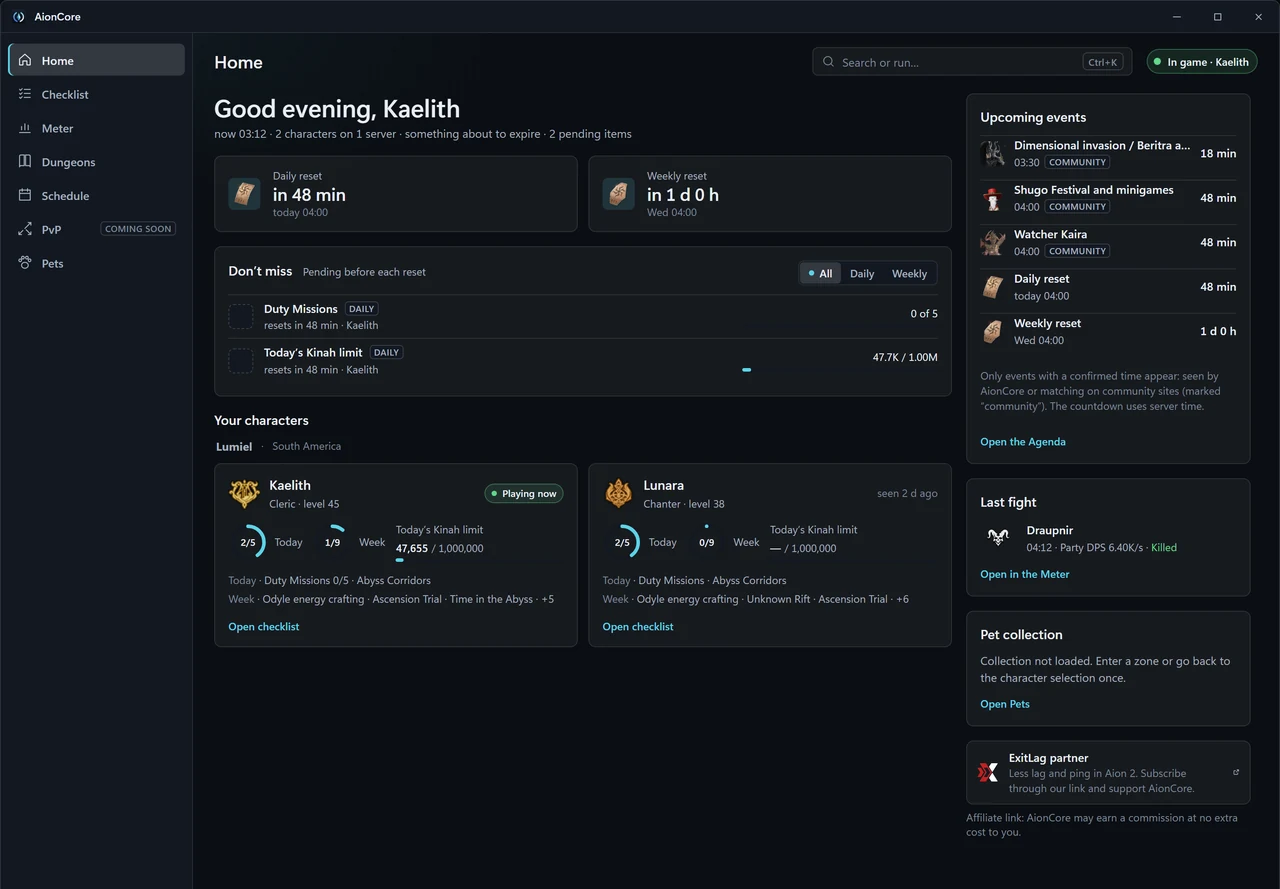
The AionCore main window on the Home tab, with sample data: Ctrl+K search, the daily and weekly resets, the tasks pending before each reset, cards for two characters, upcoming events, the last fight and the ExitLag partner card.
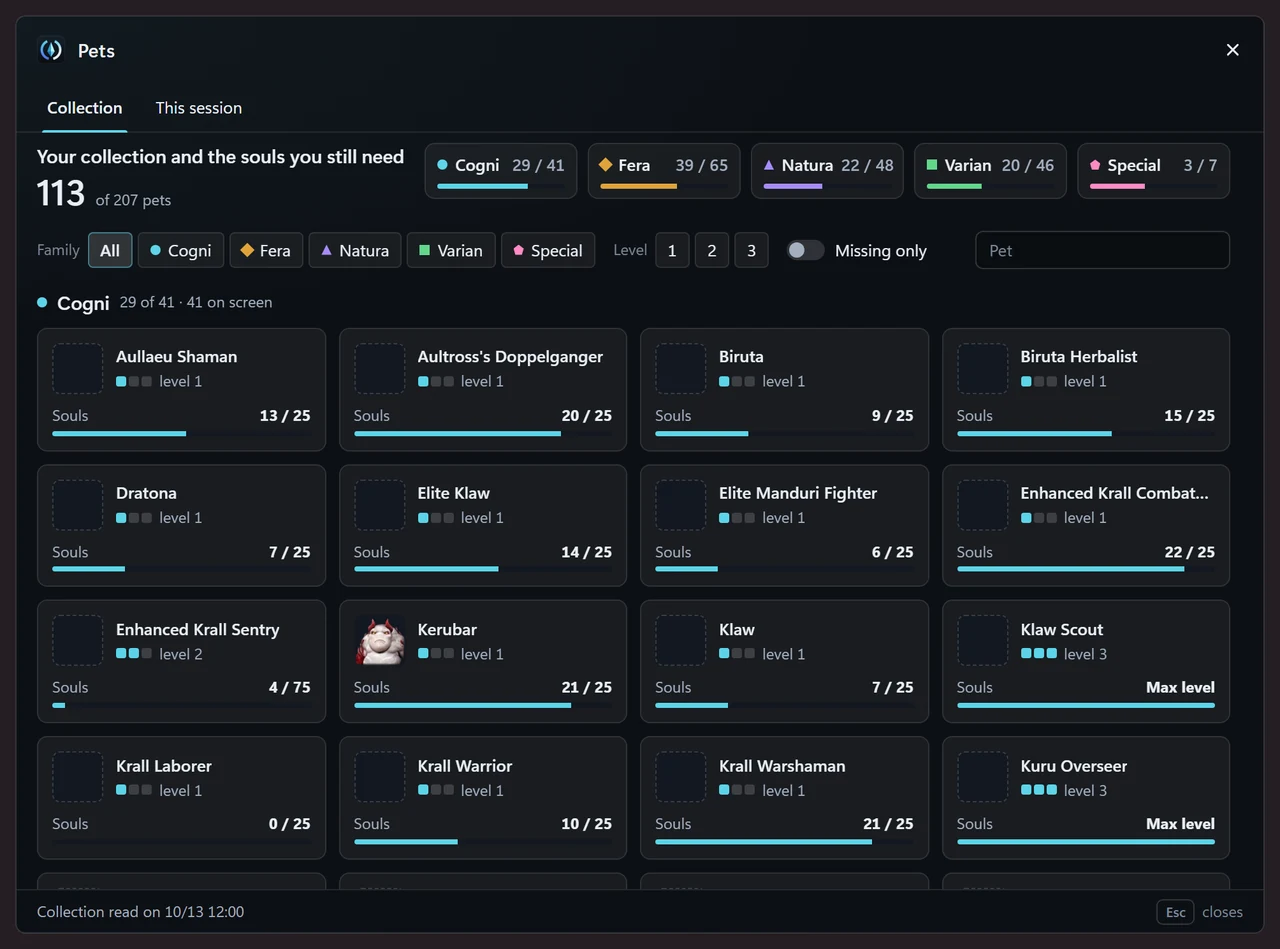
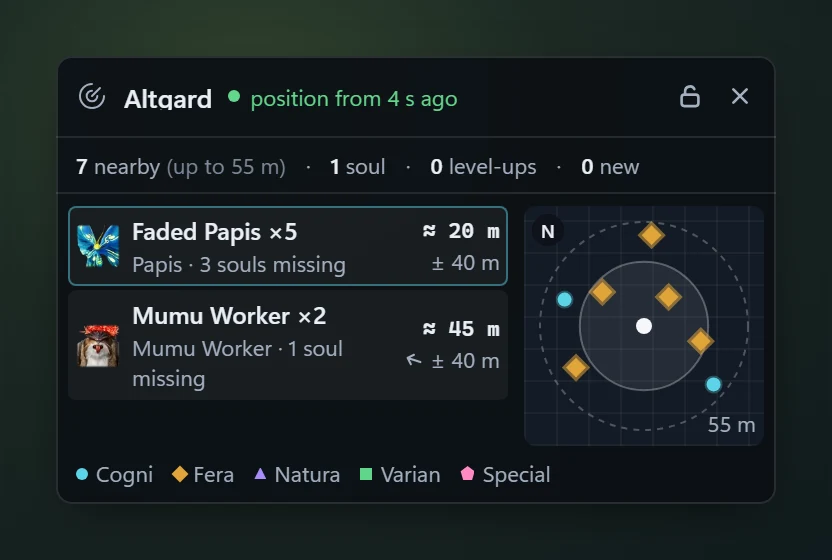
The pet radar over the game: the map name, the age of the position, the counters and a list of monsters with the approximate distance and the missing souls, next to a minimap.
Composite of real app screens · sample data

All of it comes in the same installer.

Live meterFree

Everyone’s damage, over the game.

Each player's and the party's DPS, the boss's health and the estimated time to the kill. Picks Me, Party or Raid on its own.

  • The Classic, Glass, Dense, Panel, and Stripes looks, with the Glass finish on topFree
  • DPS, HPS and Taken tabs: each player’s damage, healing and damage taken.Free
  • AionCore Theme: a two-line header, trend arrows and columns per role.Supporters only
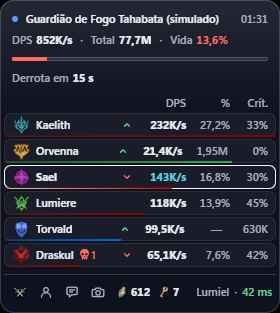
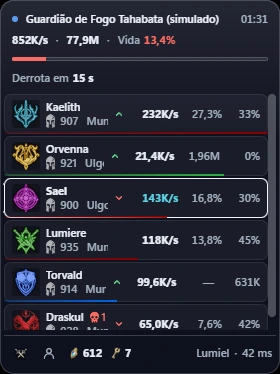
The AionCore Meter in AionCore Theme, Asmodian atmosphere, in a simulated fight against Fire Guardian Tahabata: the header with DPS, total and HP, the kill forecast, six players with the trend arrow and the bottom bar.
App screen in Portuguese · simulated fight · AionCore Theme, supporters only

Main window

Your game day in a single window.

A window with a side menu leads to Home, Checklist, Meter, Dungeons, Schedule and Pets. It opens from the bar’s Quick settings menu or from the Windows tray.

  • What is left to do today and this week, character by character.Being validated
  • The week’s events and the field bosses, with a countdown.Being validated
  • Field bosses, events and each character's Odyle energy, with times.Free
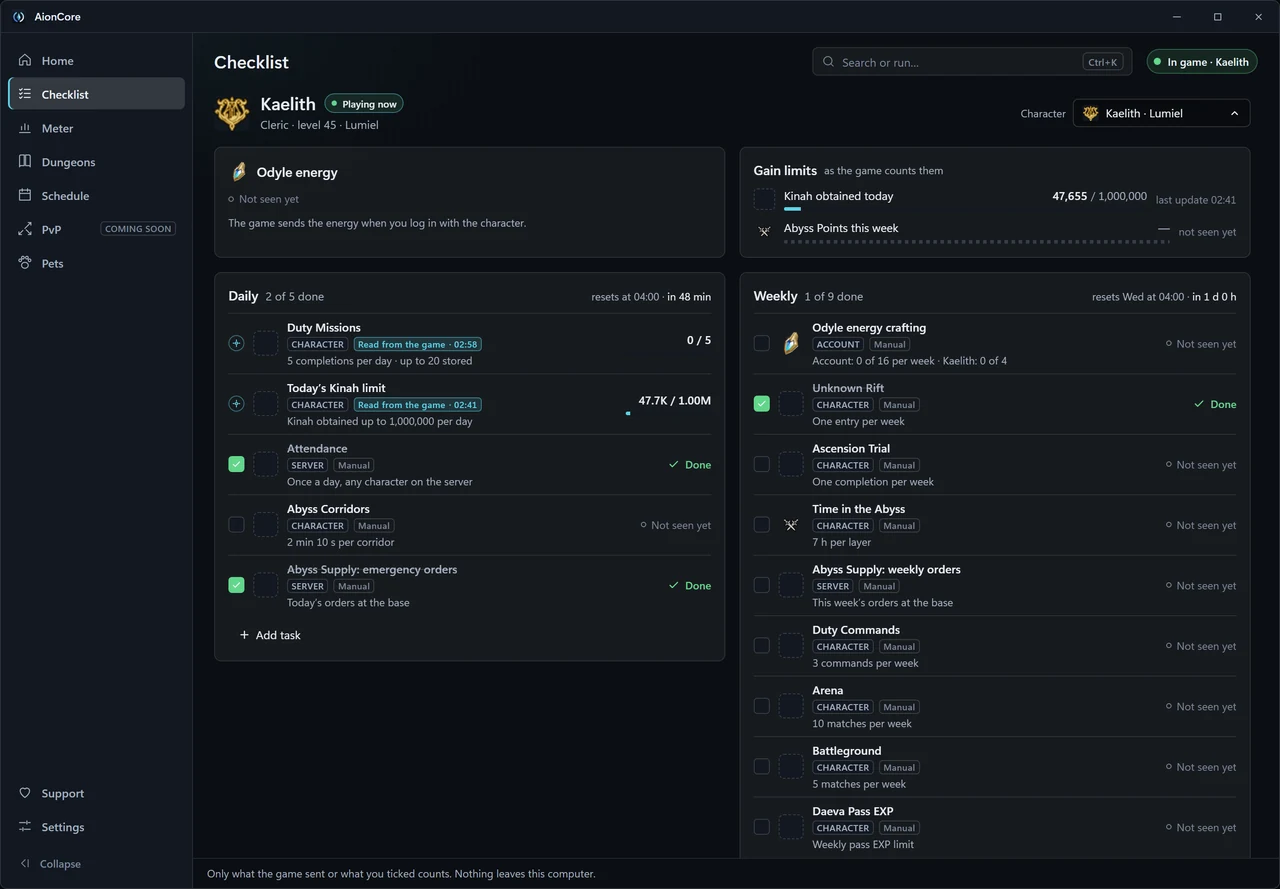
The AionCore Checklist, with the Odyle energy and Gain limits cards and the Daily and Weekly lists, each task tagged Read from the game or Manual.
Real app screen · sample data

After the fightFree

Every fight stays saved on your PC.

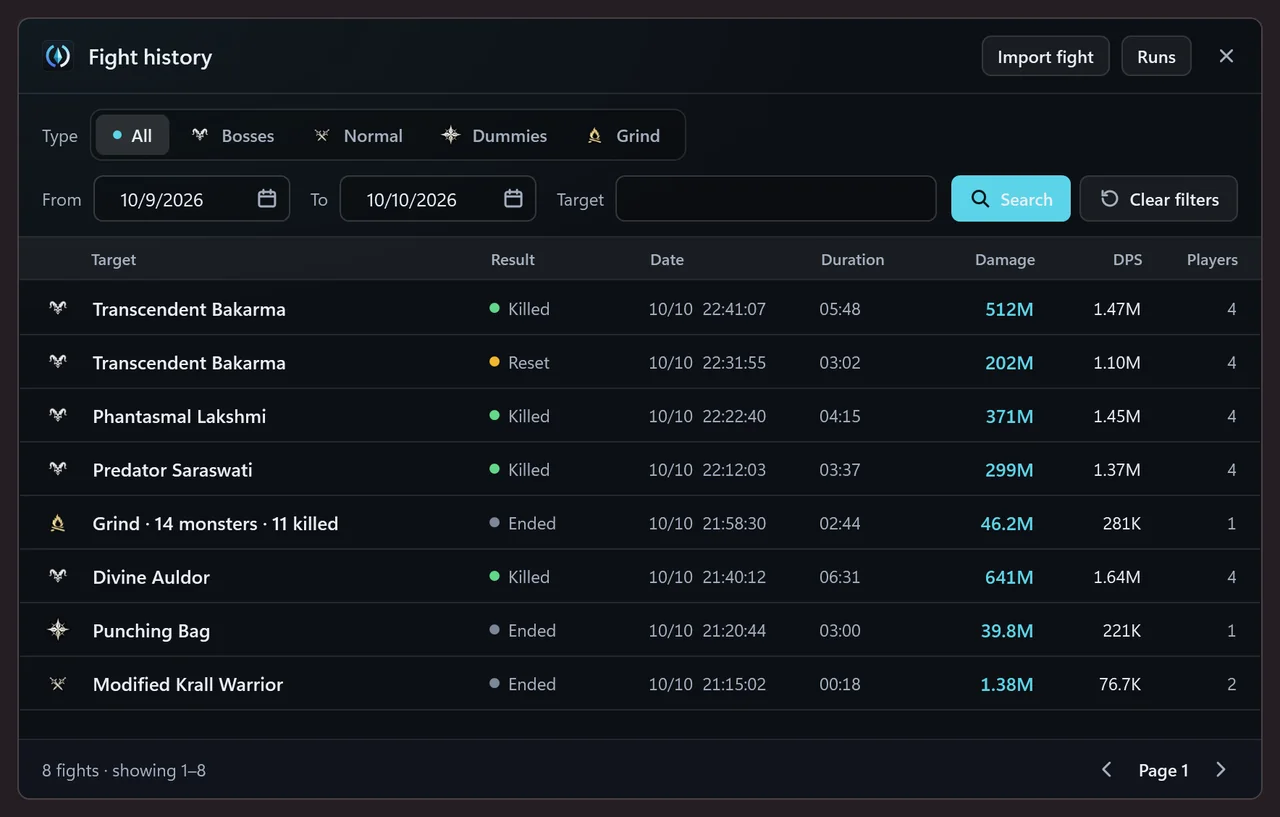
Every fight is saved on your PC with the result, date, duration, damage and party DPS. Filter by type, date and target; one click opens the fight's summary.

  • Your fights, filtered by type, target and date, plus boss runs (back-to-back bosses) with the total time.
  • See what changed between two tries.
  • JSON, CSV for spreadsheets and PNG images. An exported fight opens in the History of any other AionCore.
AionCore's Fight history window: the type filter (All, Bosses, Normal, Dummies, Grind), the dates and the target, and eight fights from one evening with the result, date, duration, damage, DPS and number of players.
Real app screen · sample data

Alerts and pets

Alerted on top of the game, without losing focus.

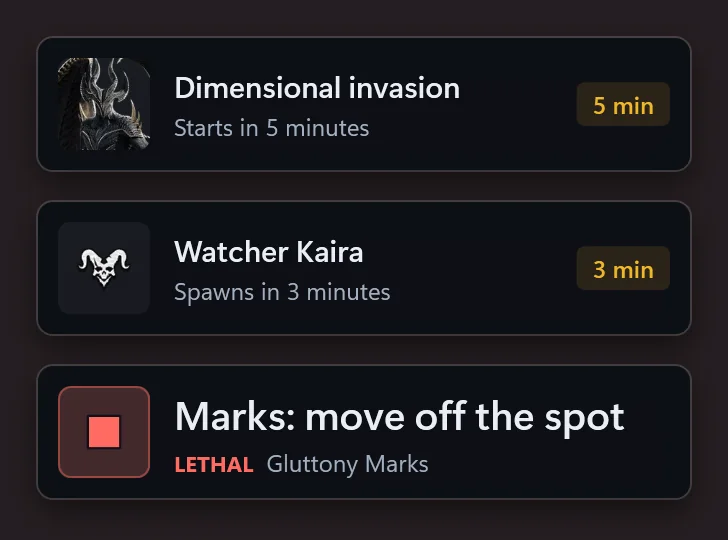
Small cards over the game before the event or the starred field boss, without taking focus from the game window. The one with the red square is the mechanic alert: supporters only until Nov 10, 2026, when it opens to everyone.

  • Marked events and field bosses, ahead of time.Free
  • Mechanic alerts: one to three words at the top of the screen before the mechanic.Early
  • Party and Expedition invites, calls to join and join requests, even with Aion 2 minimized. Opens to everyone on Jan 11, 2027.Early
  • Which nearby monsters drop the soul you are missing.Being validated
Three AionCore alerts stacked: the Dimensional invasion starts in 5 minutes, a field boss spawns in 3 minutes and a Lethal mechanic alert with the action to take.
Real app screen · sample data

Also in the app

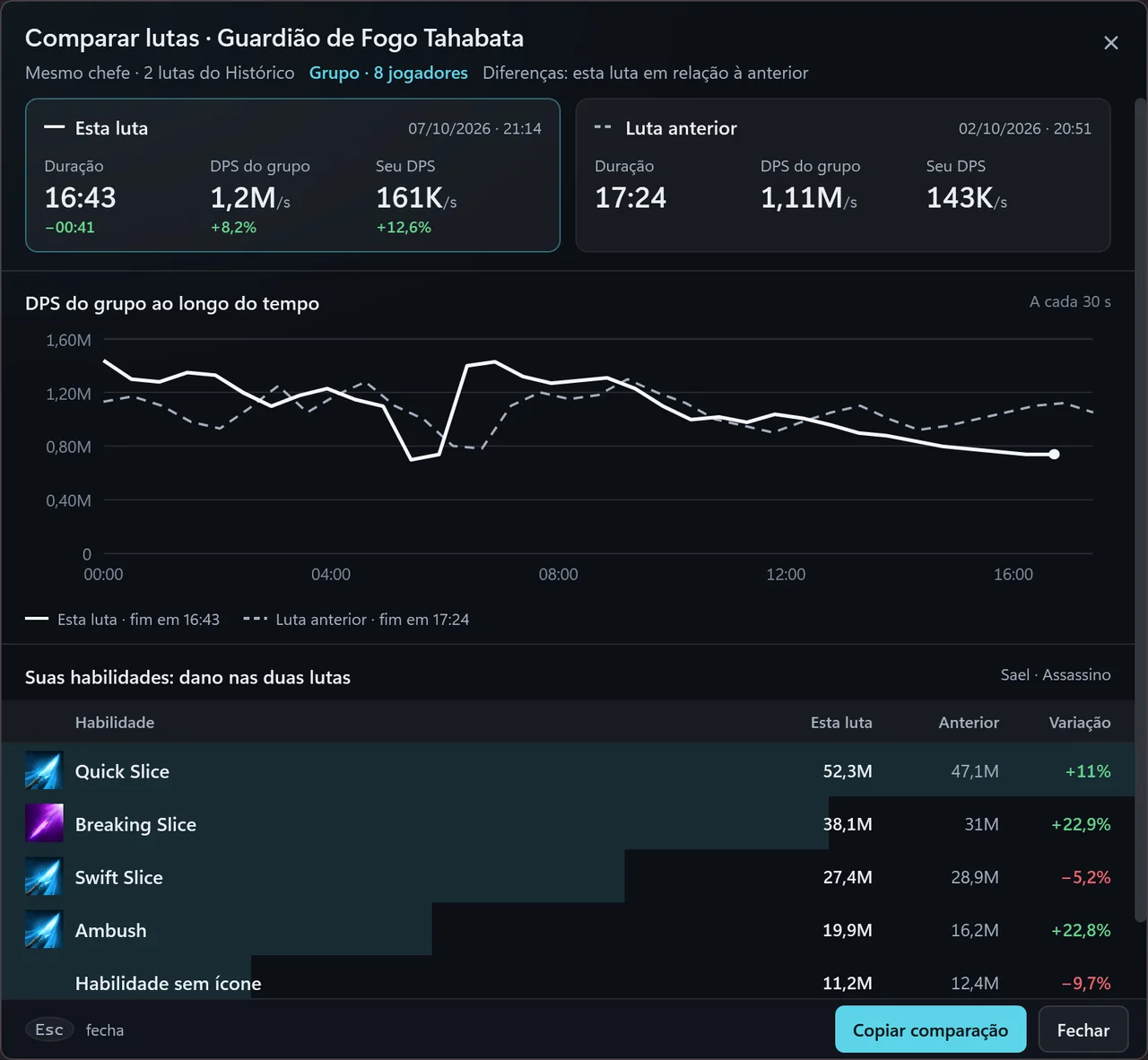
  • AionCore Compare fights window: two fights against the same boss side by side, with duration, party DPS and your DPS, the party DPS curve of both fights, the damage of each skill in both and the Copy comparison button. Compare fights The difference per player, in numbers. App screen in Portuguese · sample data
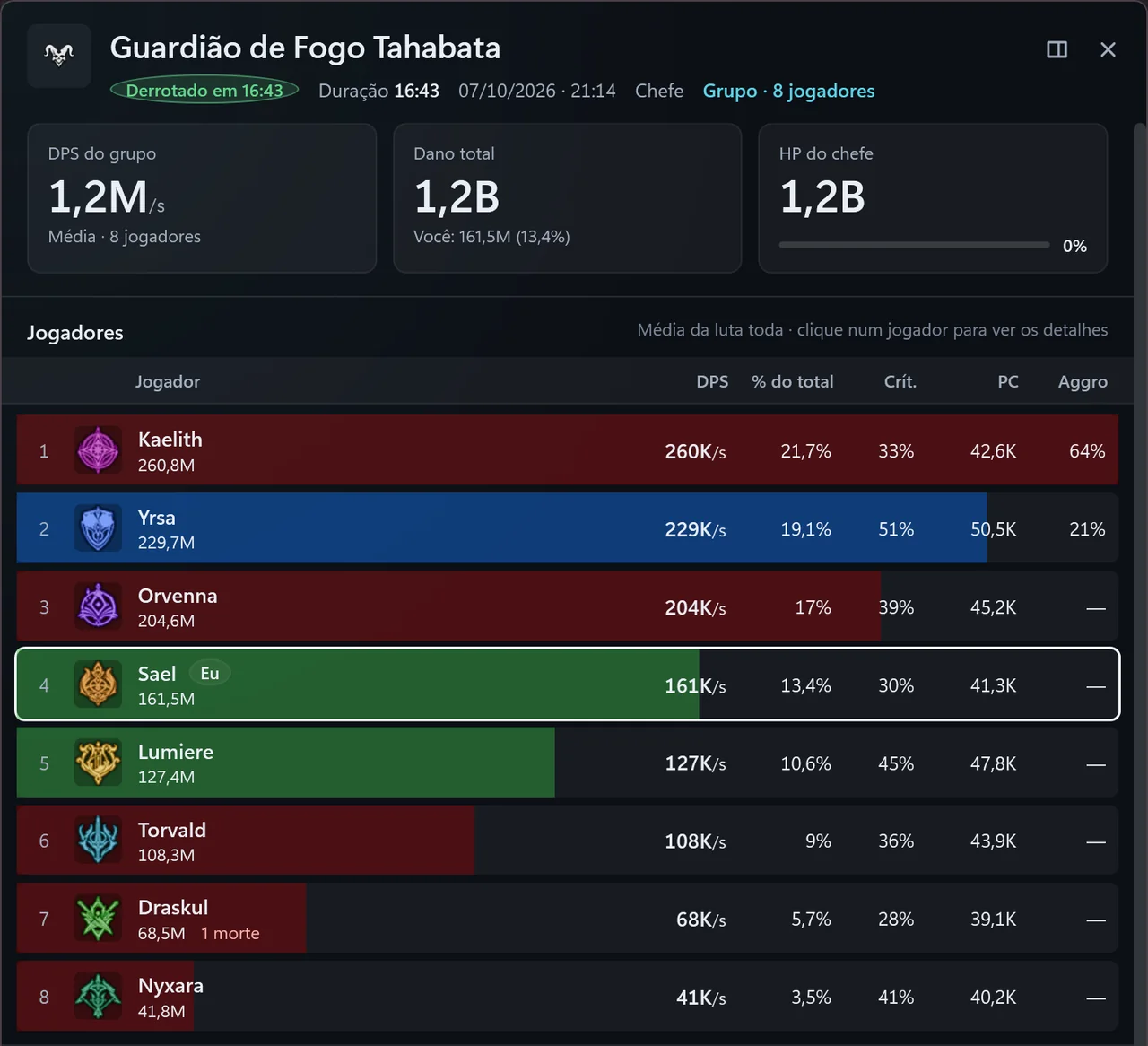
  • AionCore Fight summary window: the boss killed at 16:43, the party DPS, total damage and boss HP cards, and the 8 party members with DPS, share of damage, crit and CP. Fight summary Party DPS, each player, the DPS curve and your skills. One click copies the summary to paste in chat. App screen in Portuguese · sample data
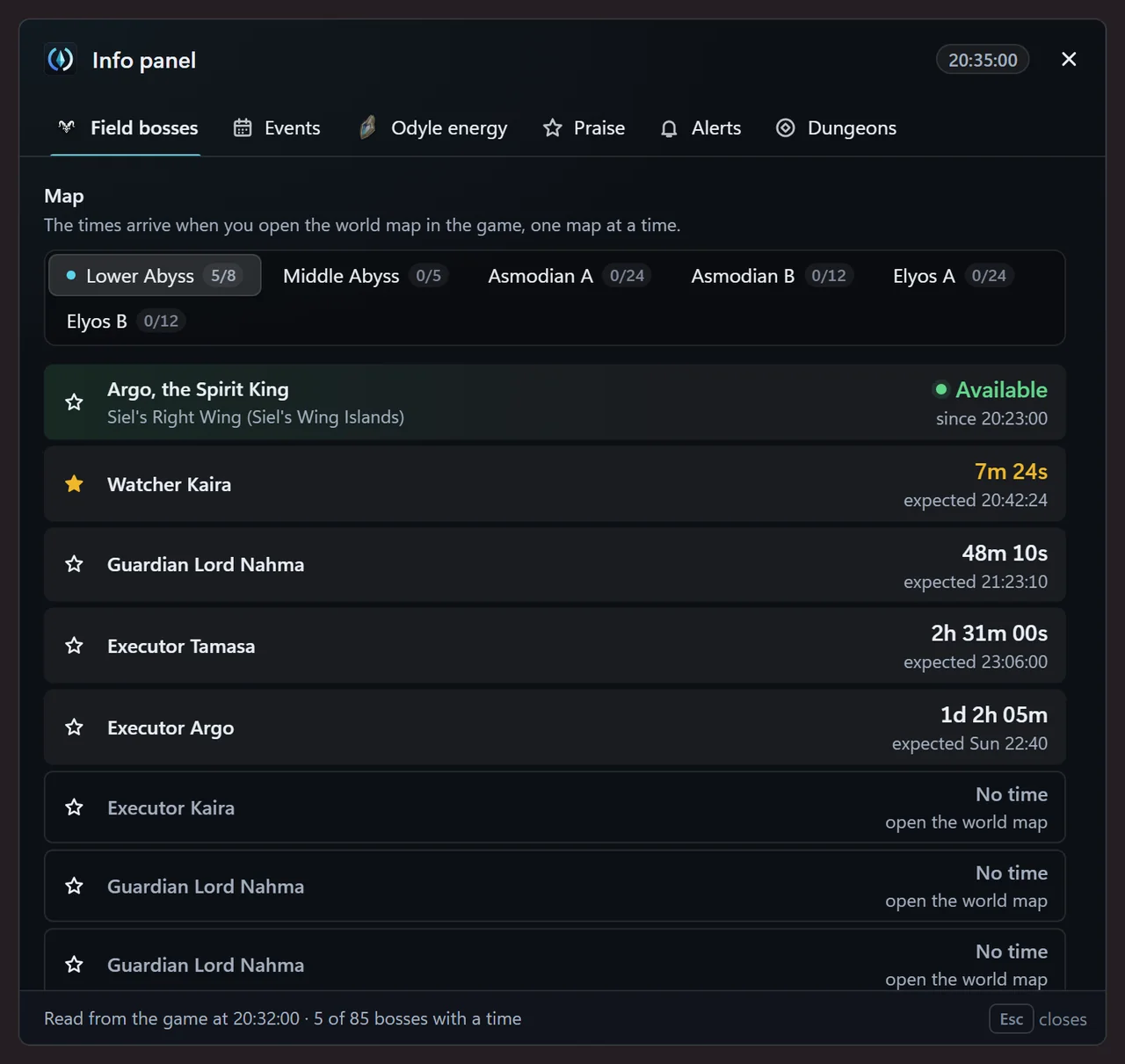
  • Field bosses tab of the AionCore Info panel: the Abyss and faction maps and the list of bosses with the time left and the expected time, one already available, one starred for an alert and the ones with no time yet. Field bosses Know when each field boss spawns.
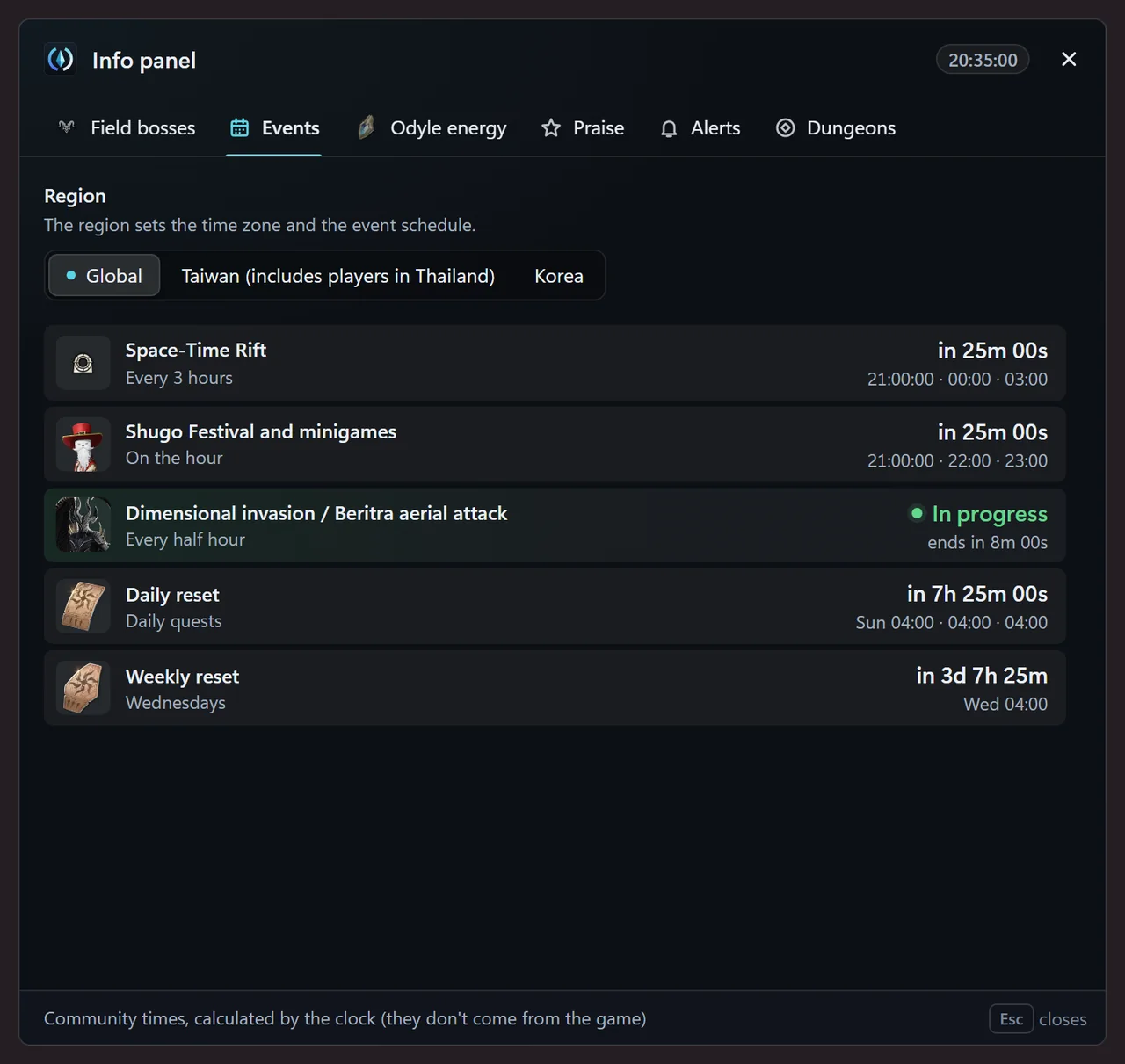
  • Events tab of the AionCore Info panel: the Global region selected and the events with the time left and the next times, with the Dimensional invasion in progress. Events Rift, Shugo Festival, Invasion and resets, without missing the time.
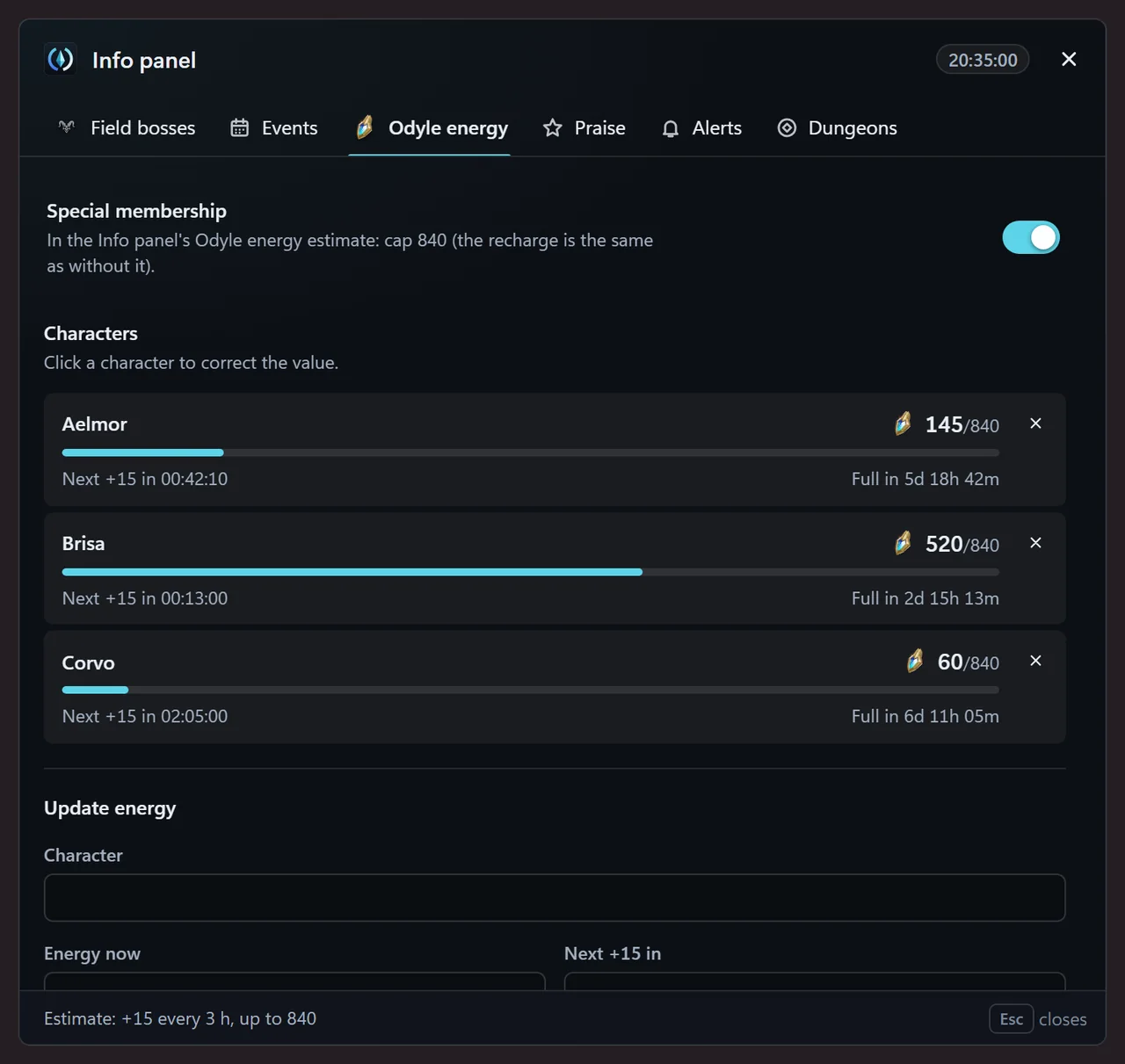
  • Odyle energy tab of the AionCore Info panel: three characters with their energy, the bar up to the cap, the time to the next recharge and when it fills up, and the form to update it. Odyle energy The energy of each character, with the next recharge and when it fills up.

Anything tagged Being validated passed the automated tests but has not been checked live in the game yet. The screenshots come from the app with sample data. If something does not match what you see, tell us on the Contact page.

See what changed

Everything that measures is free. Supporters get extras and early access.

Everything that has been published for free stays free. Support is optional: USD 15 for 12 months, paid once, no automatic renewal.

AionCore Theme Supporters only

The meter look for supporters: a two-line header, a trend arrow per player, up to 4 columns per role and the Asmodian and Elyos atmospheres. The bottom bar, with Only me, copy the DPS for chat and a screenshot of the meter only, is free in every look.

How Support works

AionCore Theme atmosphere

The AionCore Meter in AionCore Theme with the dark Asmodian atmosphere, in a simulated fight against Fire Guardian Tahabata: the header with DPS, total and HP, the kill forecast, the six player rows with level, server and trend arrow, and the bottom bar.
App screen in Portuguese · simulated fight · AionCore Theme, supporters only
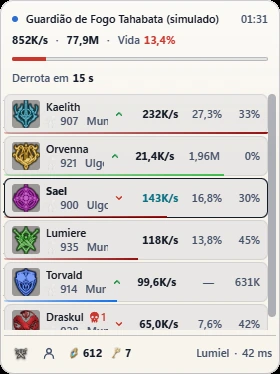
The same meter in AionCore Theme with the light Elyos atmosphere: the header, the six player rows with the trend arrow and the bottom bar.
App screen in Portuguese · simulated fight · AionCore Theme, supporters only

Besides Windows, Npcap and WebView2.

The meter needs two things besides Windows. The AionCore installer checks both and shows where to download whatever is missing.

5 items

  • Windows 10 or 11, 64-bit

    On Windows 10, version 1809 or newer. 32-bit versions and Windows 7 are not supported.

    Required
  • Npcap

    The driver that lets the meter see network traffic on Windows. The AionCore installer does not install Npcap: download it from the official site (npcap.com) and check WinPcap API-compatible Mode and Support loopback traffic.

    Needed
  • WebView2

    The Microsoft component that draws the meter's windows. It already comes with Windows 11; if it is missing, the installer warns you.

    Needed
  • Administrator permission

    Not requested by default. For the bar and overlays to hide in the game menus using the Alt and Esc keys, turn on Open AionCore as administrator in Settings: only those two keys are read, with the game in the foreground, and nothing is recorded or sent. Without administrator rights, the game cursor rule applies.

    Optional
  • Aion 2 in borderless window mode

    In exclusive fullscreen the meter does not appear on top.

    Recommended

From download to the first number.

  1. Download the installer

    Open the downloaded file. If the browser blocks the download, choose Keep.

    Windows may show “Windows protected your PC”. Click More info and then Run anyway.

    On Windows 11, if Smart App Control is on, it blocks the installer with no Run anyway option, because the file has no digital signature. There is no way to allow just AionCore: turning it off, in Windows Security › App & browser control, is up to you.

  2. Get Npcap

    The meter needs Npcap to read the network. Install it before opening, if you do not have it yet.

  3. Open AionCore

    Open AionCore from the Start menu. The first time, the first-run setup shows the usage and data notice and asks for your language and region; connecting Discord is optional. After that, the icon stays in the Windows tray.

  4. Open the game and fight

    The top bar appears over the game, and the meter on the first hit. Ctrl+Alt+M shows or hides the meter, and Ctrl+Alt+D hides or shows everything.

After installing

  • New versions arrive on their own: AionCore downloads and installs them, and the automatic install never happens while Aion 2 is open. If you click Update now, it happens right away, even with the game open. To turn off automatic updates, go to the meter's Settings › About › Update automatically.
  • To uninstall, go to Windows Settings › Installed apps › AionCore. It asks whether to delete your data too; the default answer is to keep it.

What people ask most before installing.

All questions
Why does Windows or my antivirus show a warning during install?

The installer has no paid digital signature, so Windows does not know the publisher and shows “Windows protected your PC”. Click More info and then Run anyway. For the same reason, an antivirus may ask for confirmation or block the file: before allowing it, check that it is the original.

Can I get banned?

AionCore reads your PC's network traffic and the game window title, without changing game files or memory.

No tool of this kind can guarantee how the game's policy will treat it: you use it at your own risk.

What do I need to install?

Windows 10 (version 1809 or newer) or 11, 64-bit, and Npcap, which the meter uses to read the game: in the Npcap installer, check WinPcap API-compatible Mode and loopback support. The meter also uses WebView2, which already comes with Windows 11. The AionCore installer checks both and shows where to download them if they are missing.

The AionCore installer does not ask for administrator rights: it installs only for your user. Npcap's installer does, because it installs a driver. AionCore opens without administrator rights; in Settings, Open AionCore as administrator (Windows asks for permission) lets the hide-in-game-menus feature read the Alt and Esc keys, only those two. If Npcap is restricted to administrators, the meter offers Reopen as administrator, for that launch only; to avoid needing it, install Npcap without restricting the driver to administrators.

Is it free?

Yes. Everything that measures is free, with no subscription and no paid advertising; there is a partner card (an affiliate link), labeled on screen. Support is optional and unlocks extras.

Check that the file is the same one we published.

The SHA-256 is the fingerprint of the file. Open PowerShell in the download folder, run the command and compare it with the SHA-256 below. If a single character is different, do not install.

  • It matches: go ahead and install
  • It does not match: delete it and download again from here
SHA-256 74805f3e8aa9a021dcdb8c6bf8a07a4382563900bc753e287c0ca1b5948dc837

PowerShellDownloads

Get-FileHash .\AionCore-Setup-1.17.1.exe -Algorithm SHA256
Algorithm  Hash
SHA256     74805F3E8AA9A021…948DC837

Notes for 1.17.1

Only what is new is listed here. Improvements, fixes and notices for each version are in All versions.

  • New Farm map (Pets › Farming): drag with the left button, use the mouse wheel to zoom in and out (Ctrl + wheel and the touchpad pinch work too) and double-click to see the whole map.
  • New With the map focused, + and − zoom, 0 shows everything and the arrow keys scroll. Ctrl +, Ctrl − and Ctrl 0 are still the interface scale.

All versions

Ready for the next fight.

Download installer

Free · For Windows · 150.7 MB

The Terms of use changed on Oct 15, 2026: on the ranking, presence, the character name and fight details now start on, each player's combat power shows next to the class, anyone who shows their name has a public profile, which also starts on, and the supporter badge now also shows on the profile, with the month and year the person started supporting. The profile now also shows the game data that appears in the inspection (equipment, titles, legion, Arcana, Daevanion and the count of each type of praise) and, if you turn it on in the meter, your build. In My account you can hide your name, the badge or the game data, turn off the details or the profile, or leave the ranking; without an account, use the form on /ranking. All for free. The Support terms also gained section 4.11, on the party applicant card, which applies only to supporters. Read the Terms of use